
I’ve held off sharing my impressions of the Mackie MCU Pro line of mixers because I didn’t wanna’ alienate anyone. Also because I wanted to be sure I had a solid understanding of the differences between the Mackie MCU Pro line and the Behringer X-Touch line (the X-Touch and X-Touch Extender exclusively). But after designing the remote maps needed to use both brands with Reason, I feel I would be letting people down by not discussing in detail why the Mackie MCU Pro line is inferior to the Behringer X-Touch line.
Getting the obvious outta’ the way
There’s some benefits of the Behringer X-Touch line over the Mackie MCU Pro line that aren’t really the focus of this article. So let’s briefly go over those benefits.
The X-Touch line (X-Touch and X-Touch Extender) has VU meters, is cheaper by nearly half ($449 vs. $1,099) and has better looks (once you take off the tacky, plastic sides). While those points help, the part that makes the Mackie MCU Pro line inferior is down to…
Mackie’s wacky rotary encoders
The hidden drawback of the MCU Pro line are the rotary encoders. They’re completely inferior to the entire Behringer digital rotary encoder devices, from the BCR2000 to the X-Touch Extender. The rotaries of Mackie MCU Pro line devices function horribly because they don’t contain any acceleration function.
When you have to turn a knob from the full value of 0 (7 o’clock) to 127 (5 o’clock), on the MCU Pro you have to turn the rotary a full 5 times completely. In real life, it would simply take a twist of your fingers to turn a knob from 7 o’clock to 5 o’clock.
For Behringer X-Touch mixers, they support acceleration for their rotary encoders. Meaning you can turn the rotary knob slowly to change values from 0, 1, 2, 3, etc. But if you twist the rotary quickly, you can go from 0 to 127 in one motion.
In this GIF, I’m using the MJ Enhanced Combo Extender remote map I created on my X-Touch + Extender. I’m turning the low frequency gain knob of a mixer channel. The parameters in Reason for this knob goes from 0 to 1,000 and moves by 10 ticks. You can see, in one motion, I can change the value from 0 to 1,000. Yet I can also move the encoder by the smallest increments. The most important thing to focus in the GIF is the LED encoder’s position to get a visual understanding of the importance of this.
You might think this isn’t a big deal, but it’s a huge deal. In mastering, you need to sweep knobs, changing knob values quickly. This isn’t possible at all with the MCU Pro. Mackie MCU Pro and XT Pro owners don’t complain about it, but that’s simply because they either don’t realize this or they view it as an acceptable flaw. Yet if it were so acceptable, then Mackie would still be selling the Mackie C4 Pro. But…
The reason the Mackie C4 Pro was abandoned
The rotary encoders of the Mackie MCU Pro line are the reason so many people were buying the Mackie C4 Pro and immediately returning them. The MCU Pro, XT Pro and C4 Pro all use the same encoders and digital hardware for controlling the rotaries.
Mackie discontinued the C4 Pro because people were expecting to preforming sweeping actions with the rotary knobs for controlling synths, effects and other devices. Yet I personally find my most demanding “knob sweeping” needs are not when controlling synths or effect devices but controlling the mixer.
Most MCU Pro owners won’t report discontent
Many people who own Mackie MCU Pro and XT Pro’s may not complain about the rotary knobs, but that doesn’t mean these issues don’t exist when compared to Behringer X-Touch’s. Just like if you were to ask me, a Behringer X-Touch owner, if I have any complains about the quality of the motorized faders, I’ll say no.
But that doesn’t mean the X-Touch’s faders are on par with the MCU Pro’s or that the X-Touch’s faders aren’t complaint-worthy. Just because fader noise is something I “never” notice because I’m “always playing music through speakers or via headphones” doesn’t mean they won’t bother other people.
MCU Pro owners will twist, twist, twist, twist, twist their way through their rotary encoders and may not speak ill of them, but the problem doesn’t go away.
The Behringer brand gets undeserved flack
A lot of people have this notion that Behringer makes bad products or they’re of lesser quality than more expensive products. I haven’t found this to be true at all. I’ve owned products from Alesis, Akai, AKG, American DJ, Gemini, Korg, LiveWire, M-Audio, Ocean Matrix, Roland, Samson, Sony, Tascam and Teac. The products I’ve owned from Behringer have all been high quality, durable and dependable.
I don’t buy based on brand, I buy based on the merits of an individual product. So it’s telling that of all the brands I’ve mentioned, I’ve owned the most Behringer products. First was the BCF2000, then BCR2000, MS20, X-Touch, X-Touch Mini, FCA1616 and most recently the X-Touch Extender. The most delicate of those products, the three motorized mixers, were each bought used and they all function flawlessly.
Behringer almost always introduces a product later than their competitors and at a much cheaper price while many times adding additional features. Somebody spends $1,000 for a product, develops brand / model loyalty (to justify their purchase) and then another brand comes out with an alternative for only $500?
Of course people are going to talk crap. So many people hate Behringer products simply because Behringer has a habit of disrupting product categories; similar to some of the hate Apple and Samsung experience.
Behringer X-Touch is the superior device
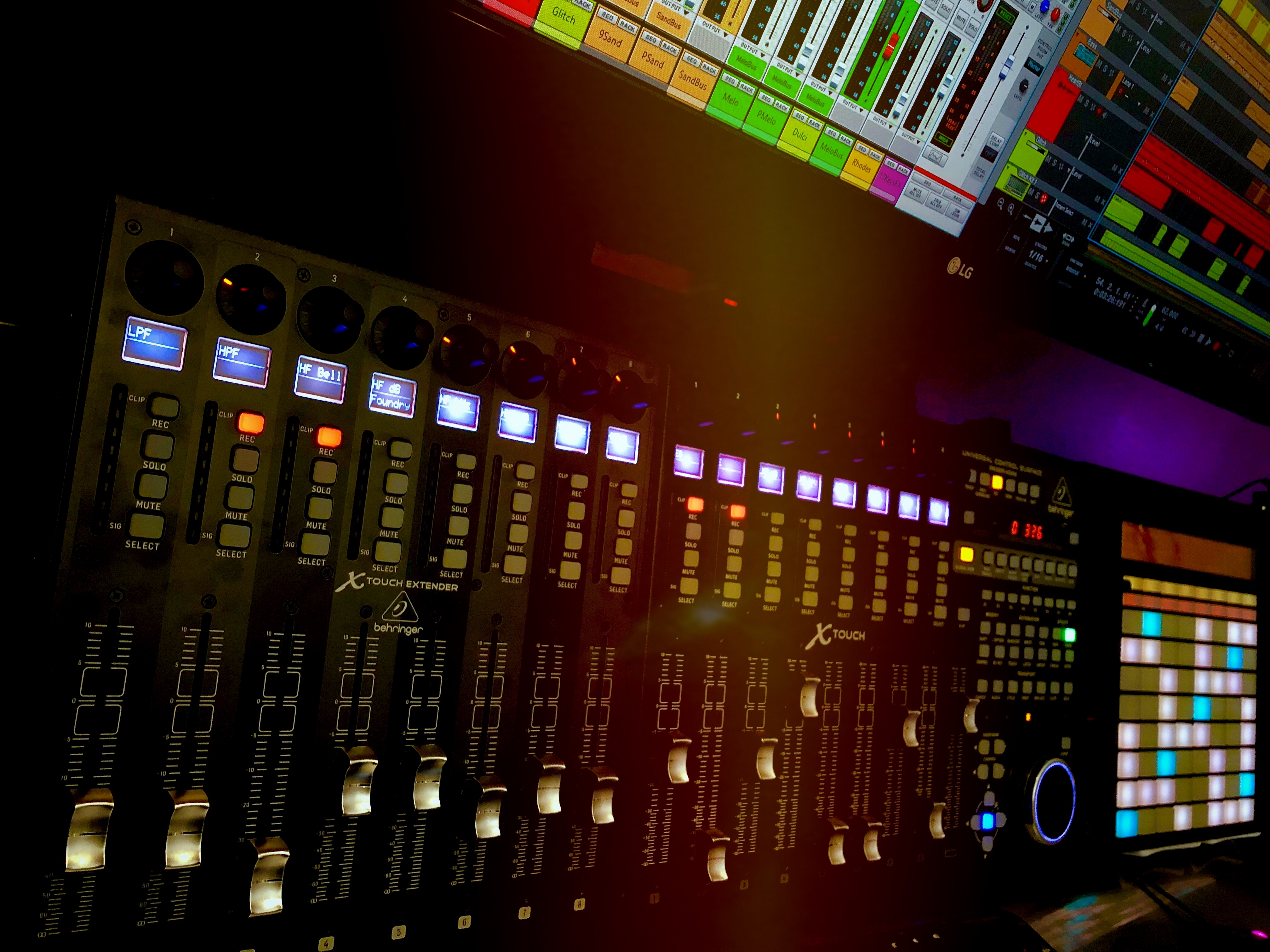
The Mackie MCU Pro and XT Pro are very capable mixers with quieter faders, work well on flat surfaces and perform nicely with Reason (because of the MJ Enhanced Universal Control / MJ Enhanced Combo Extender). In fact, I personally view the original MCU line as being iconic and an important part of control-surface history. The Behringer X-Touch line is modeled directly off of the MCU Pro line after all. But because of the MCU Pro’s rotary encoders, looks, lack of VU meters and price, the Behringer X-Touch line is clearly superior.
Later. – MJ


Very nice article. Thank you for your observations and opinions. I agree with pretty much everything here 🙂
Was hoping for a bit more of a comparison other than encoders, e.g. build quality at various levels and action.
The Mackie C4 encoders report acceleration but it is up to the software how it responds with that info, i.e. how much acceleration is applied at each stage (your sweeps are achievable, though lack of software implementation holds it back). The C4 died because of poor software support from Mackie and vendors (its very much software driven to translate its fixed data), but none the less its a solidly constructed piece of kit although has smaller encoders that may not be to everyones taste (but the displays win it back for me). The BCR2000 has a brain and better feeling encoders IMO, but much cheaper plastic used and no display.
While acceleration can be implemented in both hardware and software, I think the problem here is that the encoders are very low-res. High-res encoders can emulate low-res, but unfortunately low-res can’t emulate high-res. I don’t know how but Behringer BCR and BCF controllers have very high-res encoders, literally you can go from 0 to 127 in under one full turn in steps of 1 without acceleration, which is remarkable considering the price. Controllers with cheap low-res encoders usually have to skip values i.e. go up/down in steps of 2 or 3. I also owned a Mackie Control Universal from 2007 till 2009 (the old model) while going through my initial gear-hoarding stage. The thing was huge, and even though my desk was quite large, there was never a convenient spot for it, because there are many things I’d rather put at the centre of the desk (computer keyboard and mouse, MIDI keyboard, pad controller, etc). Eventually I had to put it on the side of the desk which basically rendered the thing useless because for mixing you really want it in the middle. In the end, it was just sitting there looking pretty and collecting dust, so I figured I didn’t need it that much and sold it on eBay. Now I just use a remote control app on an iPad. No dust to clean, no broken faders, no crappy encoders, full track names are displayed, etc, and best of all I can take it with me when working on the road and use it wirelessly.
Hey S. I’ve come to the same conclusion regarding the hardware encoders. Behringer encoders are awesome. Encoders from Akai via the Able Push (1st gen) are nice too. I wouldn’t say they’re as nice as Behringer’s, but not because of quality. It’s that the Push encoders have no detents like Behringer uses (likely because they chose smooth movements for things like scrubbing positions). You can still do precise movements. I love my iPad… this entire site was written via my iPad Pro 11”, including this comment. But for travel, damn… I can’t recommend enough an Ableton Push running PusheR. https://www.jaexx.com/blog/r…
Does Push use SysEx to communicate with Reason? It definitely seems like they’ve done a good job integrating the two. Most DAWs just implement MCU which, though universally compatible, has severe limitations and is “stuck in the past”. For some reason every brand out there is re-hashing the same crap over and over. I don’t even know why they bother to design ‘new’ controllers using regular pots and non-motorised encoders, which are close to useless, and when they use encoders it’s always only 8 of them, and when it’s more than 8 they are usually crap and/or without LCD scribble strips. A compact controller (i.e. not as big as the Mackie C4) with 16 to 24 high-res encoders and scribble strips would be killer.
I’m not sure what protocol PusheR uses, but it works great on Windows and macOS. I’ve used it extensively on both.
As far as the product you described, yes. I’ve been dying for a BCR2000 but with digital scribble strips. It would be great if it had an LED on the encoder, just like the BCR and X-Touch lines (although maybe allow the LEDs to go 360 degrees) in addition to a button under each encoder with an LED. That way, for sections that just have a two-state button (on / off), you can instantly see when it’s on or off.
If Behringer came out with a device like this, wow… it would be SO amazing! I would buy it instantly.
Although the Push and PusheR is so amazing as… yes, this “Super BCR2000” would do a better job than the Push, but the Push can be used as a (great) keyboard and drum pad as well as mixer and utility tool for Reason. The Push is a jack of all trades, master of none. Yet no other device can perform multiple rolls as well as the Push with PusheR
Yes, the buttons are also important. Let me count the number of times every encoder on my BCR had a button under it or, at least, was a push encoder. Unfortunately, after many years searching and waiting for the ideal controller, I gave up two years ago on this futile quest. The only controller that, at least on paper, held promis was the Livid Instruments Code 2 but when I actually tested it within minutes I knew I was returning it. Livid Instruments has created and discontinued countless controllers, all of which they looked pretty but were functionally identical to cheaper competing products. Even if you are a hardware engineer you can’t just make your own supper rule-them-all controller because you’ll still need the host to support things like scribble strips and basically anything that deviates from established standards such as MCU. Native Instruments’ Native Kontrol System (NKS) is yet another standard that’s only becoming popular because NI is a well known company. To me it’s just a proprietary standard from a company with a consistent track record of planned obsolescence and, in any case, all their controllers only have 8 encoders, so it’s not compelling at all. Then, whenever something with 16 or more faders comes out, it’s usually huge and few people buy it. I actually don’t mind using rotary encoders to control levels, in fact I prefer it because encoders don’t need motors so they are much less likely to fail. Watch out for that next latest and greatest MIDI controller or keyboard—I bet it will be a repeat of something that is already on the market, plus RGB LEDs.
I can not agree regarding the C4 or MCU. It is simply not true, what you say about acceleration. Maybe Reason has lame support for the encoders, but the encoders support accelleration till a degree where there are no questions anymore. Also the resolution is simply not true. The encoders are digital 14-bit ones. The dumb thing is, that most protocols will support only 10bit with them, but this is not a fault from the hardware. Did you even mention four displays? Man, take your BCR shit and be happy. If Behringer would have invented the whole HUI/MCU protocol, then you could talk. Behringer is a smart, criminal soft and hardware thief of other peoples innovations, nothing more. Design, development, innovation…. all this has a price, hence you can not sell something that cheap like Behringer, because well… they do not do all that stuff… they only copy and steal.
Your article tells no truth, has no proof, no facts and support that Behringer attitude. You argue with “i think the problem here is that the encoders are very low-res.” Dude where is the evidence for that? What you think and what they are capable of, are two different worlds. That is what i can say from my experience. I use my C4 like 4-5 months and i can say it is a wonderful controller. The Commander software needs also some mention here. Best tool to easily program and layout your hardware synths and fx. You can literaly have dozens of pages with a single push of a button. On a Behringer you will be lost, at the very moment where you need to control more than 32 encoders. Have fun with your stickies, poor overlays or whatever crap is needed, just to know, what exactly are you doing. A BCR is fine for one device. A C4 can control your whole studio-setup, without getting lost.
It is just sad, that you are just another dude, who can not use his hardware to full potential and then complaining about it and i also feel sad for everyone who reads this article and believing the stories that are told here.
These issues have been known for years; the onus is on you to prove everyone otherwise. Go buy a C4 (assuming you don’t own one), get a demo of Reason (also assuming you don’t own a license) and take a video reproducing the C4’s encoders working as well as the proof I provided for Behringer.
You only proofed, that reason has no acceleration support for these kind of encoders. that is all. That is no proof to me. What you say about issues, that might be true in regard of software support in general, be it Reason, Cubase etc.But ask a Logic user about the MCU product line or a Tracktion user, i am sure there will be no complain about it. Because there, works everything perfect, including the C4.
To say that the MCU product line is all in all inferior to Behringer, is just the lack of knowledge. Use a tool like Midi Translator Pro, check your documentation and start doing stuff on your own, instead of awaiting hardware support from your beloved Propellerhead or whatever company. If you would start doing that, you would be amazed how many hardware is out there, that is actually outstanding. I will never use Reason for a reason, but saying your Behringer gear works better on Reason, is no excuse to blame MCU product line. That is just childish. I will not buy Reason and create a video for you. What a argument alone… just laughable.
I do not know how Reason works on a C4, at least not with latest versions, but do you know that if you use the “Shift” button and a encoder, you would have acceleration “on-the-fly” with a C4. On my side it is a “default” option, i just do not know if Reason support that and it could be that Reason has other mappings for the “Shift” button.
I can do the same, like you do in your .GIF animation and i would have the option to do it even faster, if it is needed.
What an incredibly misleading headline. You make a claim about one feature (that in fact looks to be not valid based on the comments already posted) interacting with one product and ignore important other differences such as
1) The sliders are noisy
2) You can’t see the scribble strips at all unless you stand up or find something to elevate the unit since it doesn’t even have back legs
3) And even when you can see them, they look horrible and contrast adjustment is really limited (and you have to power-cycle to even adjust that contrast which eliminates the ability to tweak as you move around a bit)
However, I give you full marks for SEO — you did a great job getting this article to show up at the top of the search engines